Minecraft Bedrock Plains Farm Dusk Screenshot with HUD and Custom Compass AI Image Prompt
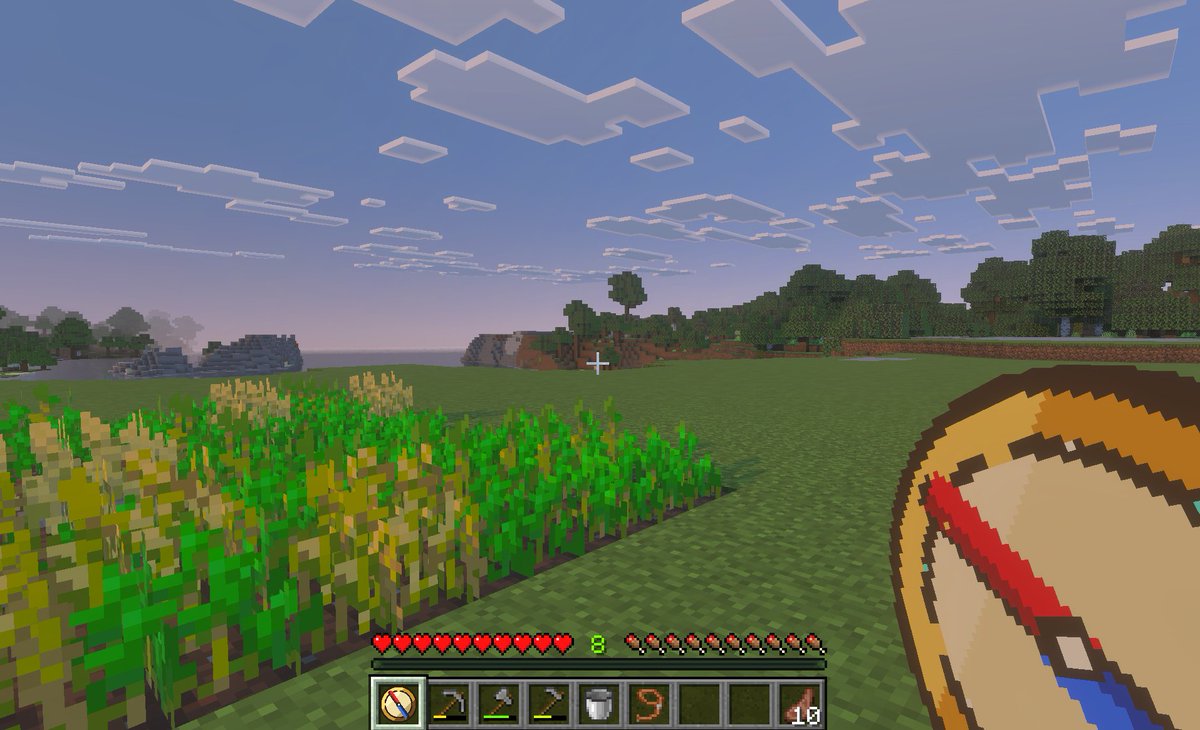
A first-person gameplay screenshot in the style of Minecraft Bedrock Edition at dusk, showing a peaceful grassy plains biome with a small rectangular wheat farm in the left foreground, some crops fully grown and some still green, an open grass field in the center, and a tree line and low blocky hills in the distance under a pale blue-to-pink evening sky filled with flat square clouds. Place a small white crosshair exactly near the center of the frame. Show the full survival HUD along the bottom: 10 red hearts, 10 hunger drumsticks, green experience level 8, and a 9-slot hotbar. The hotbar must contain exactly 9 slots, with these visible items from left to right: 1 custom compass icon selected, 1 hoe tool, 1 pickaxe, 1 axe, 1 bucket, 1 lead or rope item, 2 empty slots, and 1 stack of cooked meat labeled 10. In the lower-right foreground, overlay an oversized custom item graphic of a teleport compass held in hand, drawn as a clean pixel-art compass with a tan face, dark brown rim, cream center, and a bold red-and-blue needle angled diagonally. The selected hotbar slot should also display the same custom compass icon. Make the image feel like an in-game screenshot captured on a tablet or PC, with soft atmospheric haze, authentic voxel textures, and a child-friendly utility-mod vibe for fast travel and saved-location navigation.
Content: Subject: First-person Minecraft Bedrock screenshot. Scene: Dusk grassy plains. Style: Voxel + utility mod. Composition: Center crosshair, bottom HUD, lower-right handheld item. Lighting: Soft dusk. Color: Blue-pink sky. Material: Voxel texture. Lens: First-person. Ratio: Game screenshot. Parameters: Experience level, item count, tool name.
Pros: Parametric design allows flexible customization of experience level and tool. Rich details (precise HUD item layout).
Cons: Too many elements may confuse AI. Exact positioning of HUD and handheld item is hard to guarantee.
Reference image: No obvious reference-image dependency
Curated from publicly available creative examples. Prompts and commentary are edited and organized by this site. Please contact us with any rights concerns. Copyright & Privacy