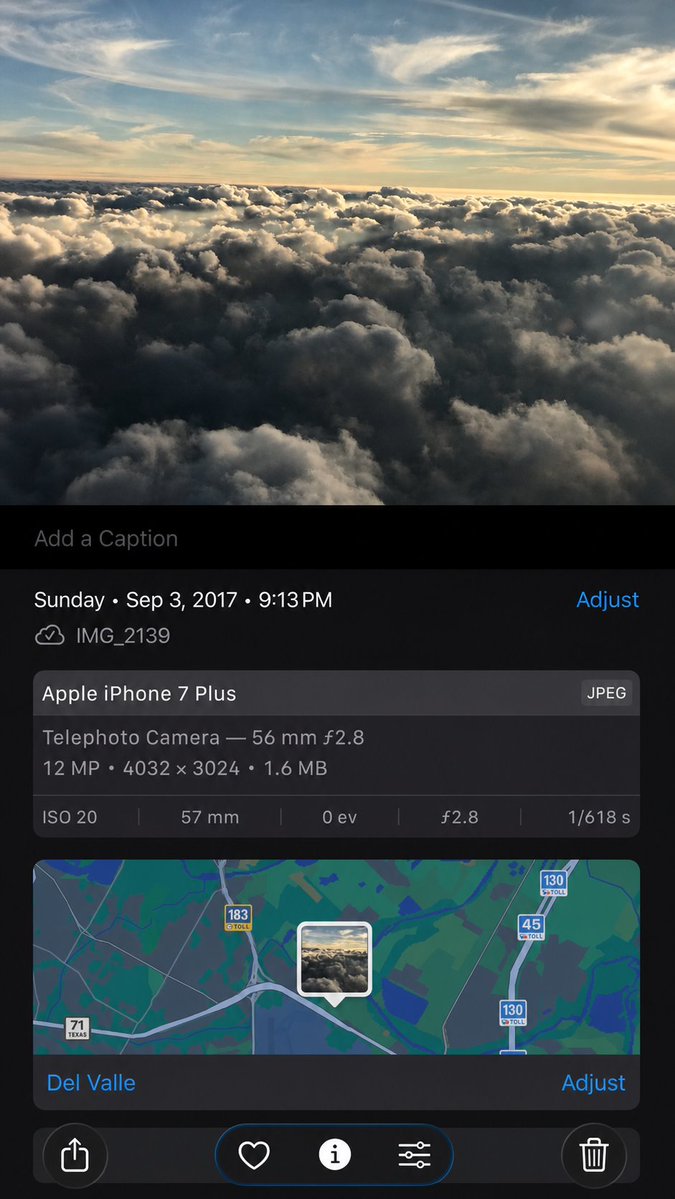
Clean synthetic screenshot from iPhone photo AI Image Prompt
Using the provided iPhone Photos screenshot as the reference, recreate it as a cleaner, high-fidelity synthetic screenshot while preserving the same overall content: the cloud photo, the Photos app metadata panel, the map, date/time, filename, camera details, and bottom controls. Subtly rebuild the cloud image rather than copying it exactly, with a slightly wider-feeling crop, sharper modern rendering, and a more polished dark iOS interface. Keep the visible text and metadata unchanged, including Sunday • Sep 3, 2017 • 9:13 PM, IMG_2139, Apple iPhone 7 Plus, Del Valle, and Telephoto Camera — 56 mm ƒ2.8; 12 MP • 4032 × 3024 • 1.6 MB; ISO 20; 57 mm; 0 ev; ƒ2.8; 1/618 s. Include exactly 5 bottom toolbar icons: share, heart, information, adjustment sliders, and trash. Keep the map section with the centered photo-pin thumbnail and the visible road shields 71 Texas, 183 toll, 45 toll, and 130 toll.
Content: Subject: iPhone Photos app screenshot; Scene: photo view interface; Style: high-fidelity, modern, clean; Composition: keep original; Lighting: sharper; Color: more refined; Material: dark iOS interface; Lens: none; Aspect: screenshot ratio. Formula: reference image + reconstruction + preserve metadata + subtle changes.
Pros: Preserves all metadata unchanged for high fidelity; rebuilds cloud image rather than copying for realism.
Cons: Strongly depends on uploaded reference image, limiting creativity; requires precise generation of 5 bottom icons and map road shields, low tolerance.
Reference image: Strong reference-image dependency
Curated from publicly available creative examples. Prompts and commentary are edited and organized by this site. Please contact us with any rights concerns. Copyright & Privacy