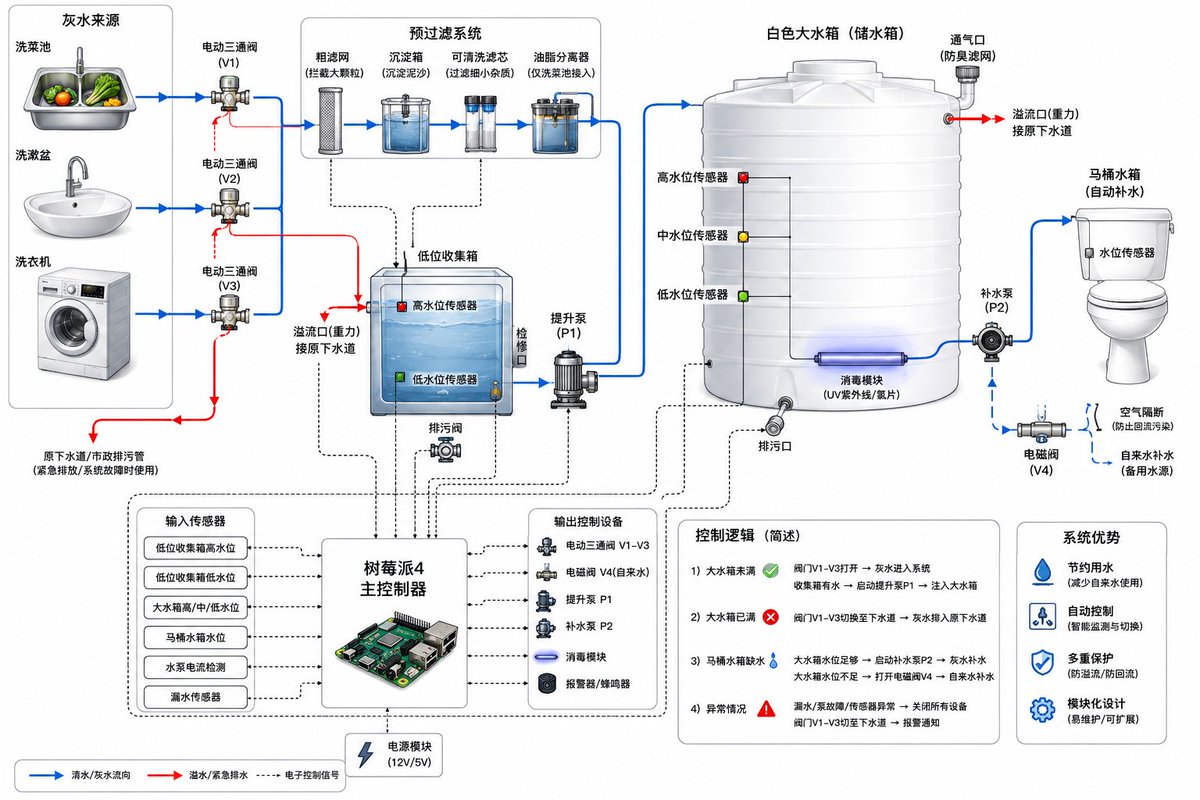
Greywater Recycling System Diagram for Toilet Flushing AI Image Prompt
Create a clean technical system diagram of a residential greywater recycling system for toilet flushing. Show three water sources on the left: kitchen vegetable washing sink, bathroom wash basin, and washing machine. Each source connects through a diverter valve to either the original sewer drain or the greywater recycling line. The greywater line goes into a pre-filter module with coarse mesh filter, sediment trap, washable cartridge filter, and grease separator for kitchen water. Then show a low-level greywater collection tank with overflow pipe to sewer, high and low water level sensors, and inspection cover. From this tank, show a greywater transfer pump sending water upward into a large white plastic storage tank. The large tank has low, middle, and high water level sensors, overflow to sewer, drain outlet, optional UV disinfection module, and ventilation. From the storage tank, show a pump or gravity outlet feeding the toilet cistern. Include a backup clean water supply with air gap and backflow prevention to the toilet cistern. Show a Raspberry Pi 4 controller connected with signal lines to sensors, solenoid valves, pumps, leak sensor, and alarm. Use blue arrows for water flow, red arrows for overflow/emergency drain, dotted black lines for electronic control. Style: modern engineering schematic, white background, labeled components, clear arrows, minimal but detailed.
Content: System diagram structure: water sources (left) → diverter valves → pre-filter module → collection tank → transfer pump → storage tank → toilet cistern. Controller with signal lines to sensors, solenoid valves, pumps, leak sensor, alarm. Arrow colors differentiate water flow, overflow/emergency drain, electronic control. Style: modern engineering schematic, white background, labeled, minimal but detailed.
Pros: 1. Clear definition of components and flow direction, easy to understand system logic. 2. Visual cues (arrow colors, dashed lines) enhance functional distinction.
Cons: 1. Text description is complex, may miss details during generation. 2. Specifies a particular controller (Raspberry Pi 4), slightly reducing flexibility.
Reference image: No obvious reference-image dependency
Curated from publicly available creative examples. Prompts and commentary are edited and organized by this site. Please contact us with any rights concerns. Copyright & Privacy