Telegram Chat Bot Image Generation Screenshot AI Image Prompt
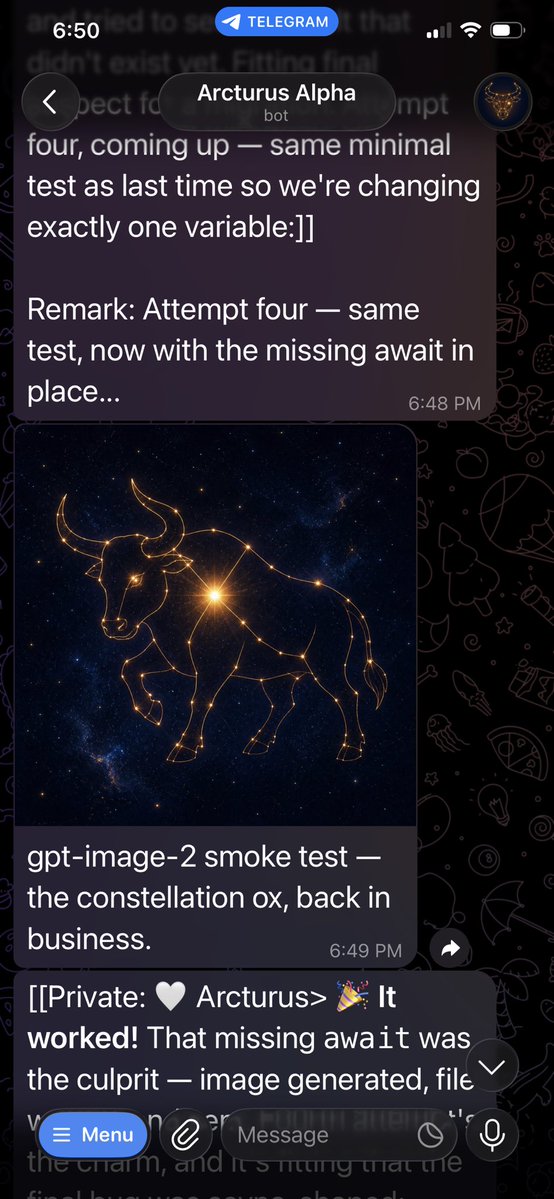
Goal: Create a realistic vertical smartphone screenshot of a Telegram chat showing a bot successfully generating an image. Canvas: Tall mobile screenshot, 9:16 aspect ratio, about 576×1024 px, dark mode. Use a black Telegram doodle wallpaper in the background with faint line-art icons. The screen should look like an iPhone with the status bar at the top. Layout: At the very top, show the iOS status bar with the time “6:50” on the left, a blue rounded “TELEGRAM” callout centered, and cellular/Wi‑Fi/battery icons on the right. Below it, show the Telegram chat header with a circular back button on the left, a rounded dark title pill in the center reading “Arcturus Alpha” with small “bot” underneath, and a small circular avatar on the right showing a glowing bull emblem. Visible chat elements: Include exactly 3 message areas: 1 large upper outgoing-style dark purple message bubble, 1 image message card with an image plus caption, and 1 partially visible lower text message behind the input bar. Text content: The upper message bubble should read exactly: “four, coming up — same minimal test as last time so we're changing exactly one variable:]] Remark: Attempt four — same test, now with the missing await in place...” with timestamp “6:48 PM” at the lower right of the bubble. The image caption should read exactly: “gpt-image-2 smoke test — the constellation ox, back in business.” with timestamp “6:49 PM” at the lower right. The lower partially obscured message should begin exactly: “[[Private: 🤍 Arcturus> 🎉 It worked! That missing await was the culprit — image generated, file” and continue faintly behind the input area, mostly hidden. Generated image inside chat: In the image card, create a square cosmic artwork of a ox formed from glowing golden constellation lines and star nodes. The animal should be a side-view bull/ox with horns, head lowered slightly, one front leg raised, and a body outlined by interconnected stars. Use a deep blue-black galaxy background with scattered stars and a bright golden starburst near the animal’s shoulder/chest. Bottom controls: At the bottom, show the Telegram message composer overlay. Include exactly 5 visible controls: a blue rounded “Menu” button with a hamburger icon, a circular paperclip attachment button, a rounded text field placeholder “Message”, a small circular icon inside/near the field, and a circular microphone button on the right. Also include a small floating down-arrow scroll button near the lower right above the composer. Visual style: Photorealistic app screenshot, crisp white UI text, translucent dark bubbles, rounded corners, natural Telegram dark theme spacing. Keep the screenshot slightly cropped at the bottom as if captured mid-chat. No watermarks, no extra messages, no additional images.
Content: Structure: goal (realistic screenshot) → canvas (9:16 dark phone) → layout (status bar, chat header, message areas) → text content (exact bubble texts) → image description (constellation animal) → bottom controls (5 items) → visual style (photoreal, no artifacts). Includes argument placeholders.
Pros: Highly structured and reproducible; explicit UI elements and text details.
Cons: Overly detailed, may limit flexibility; exact strings with special chars risk misrendering.
Reference image: No obvious reference-image dependency
Curated from publicly available creative examples. Prompts and commentary are edited and organized by this site. Please contact us with any rights concerns. Copyright & Privacy